Let me cut through the noise and give you an honest look at what's actually working for real creators right now.
The Reality Check
Here's something nobody wants to admit: most of us don't need the most expensive, feature-packed tool on the market. We need something that fits our workflow, our budget, and our actual way of working. I've watched indie filmmakers drop $200/month on studio-grade software they use twice, while YouTubers create viral content with free tools and smart prompting.
The best AI storyboard tool isn't the one with the most features—it's the one that disappears while you're creating.
⚠️ Important Note: Pricing and features mentioned in this article are based on information available as of January 2026. Software tools update their pricing and features frequently. Please verify current rates and capabilities on the official websites before making any purchasing decisions. All trademarks mentioned are the property of their respective owners.
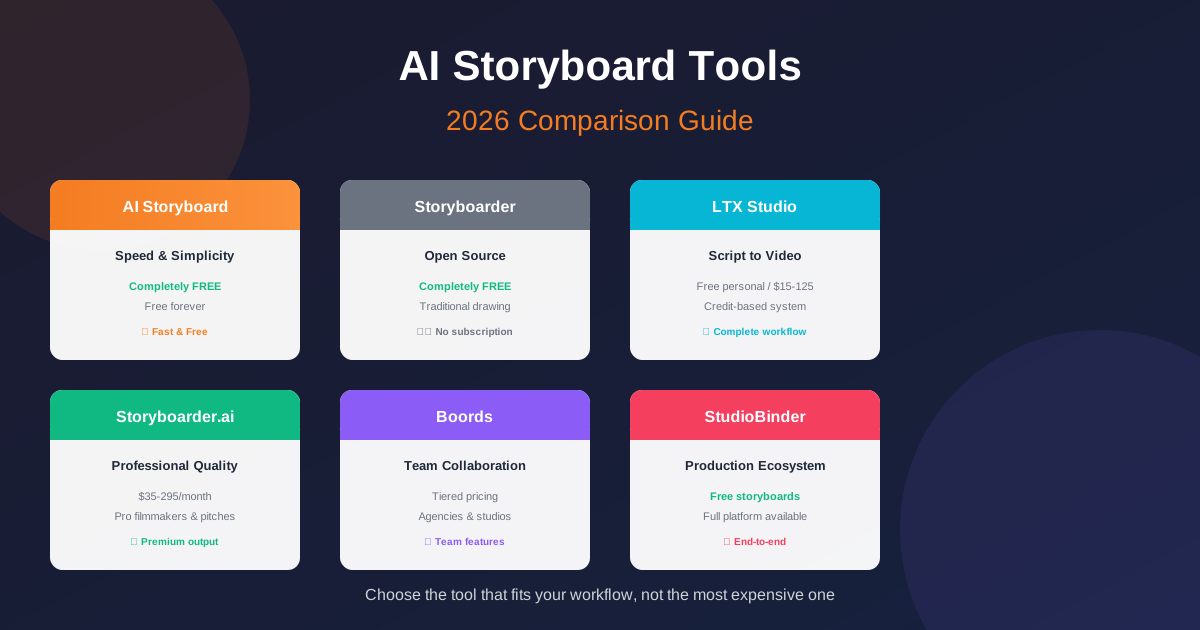
AI Storyboard (app.ai-storyboard.com)
Let's start with a tool that's taken a radically different approach: being completely free. AI Storyboard offers full functionality without payment, registration, or any hidden costs.
What it does well: You paste a script or describe a scene, and it generates storyboard panels. That's it. No complicated settings, no steep learning curve. The interface is clean enough that you can figure it out in five minutes. And did I mention it's completely free?
The standout feature: Zero friction. No account creation, no credit card required, no "free trial that ends in 7 days." You just go to the site and start creating. For short-form video creators who need to iterate quickly, this matters more than you might think.
The trade-offs: You won't find advanced shot planning, team collaboration features, or integration with production management tools. But here's the thing—that's exactly what some creators need. I've seen short-form video creators turn out ten storyboard variations in the time it takes someone to figure out the export settings on more complex tools.
Best for: Solo creators, short-form video makers, anyone who values speed and simplicity over advanced features
Pricing: Completely FREE forever
Boords: The Team Player
Boords has been around longer than most AI storyboard tools, and it shows—in a good way. They've built their entire platform around one thing: getting teams and clients on the same page.
What it does well: The collaboration features are genuinely useful. You can share storyboards with clients, gather feedback directly on frames, and iterate without sending endless email threads back and forth. The AI image generation is solid, but it's the workflow around it that makes Boords valuable.
The standout feature: Version control. I've seen agencies save hours by being able to pull up previous versions of a storyboard and show clients exactly what changed and when. It sounds minor until you're in the middle of a revision war.
The trade-offs: You're paying for features solo creators might never touch. The learning curve is real if you're just making storyboards for yourself.
Best for: Agencies, production teams, anyone working with clients who need to approve visual concepts
Pricing: Tiered pricing (visit boords.com for current rates)
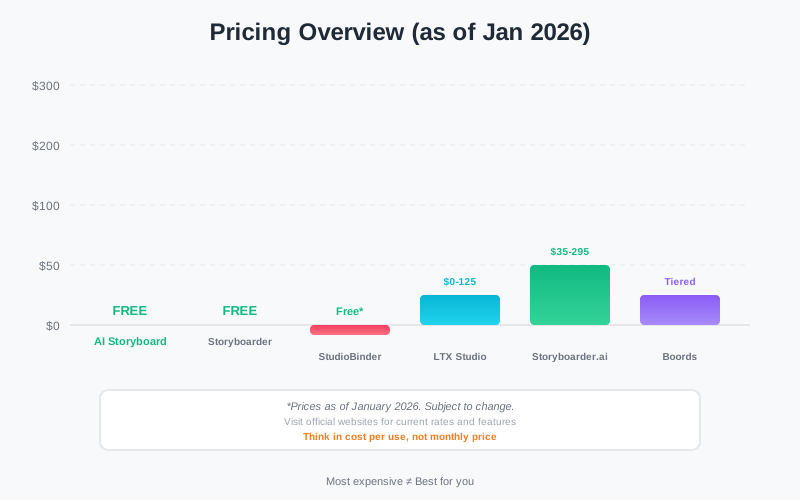
Pricing comparison: think in cost per use, not monthly price
LTX Studio: The All-in-One Bet
LTX Studio made waves by going after a different problem entirely: they're not just storyboarding, they're trying to handle the entire pipeline from script to final video.
What it does well: The continuity is impressive. You generate storyboards, then turn those frames into actual video clips, all within the same system. Character consistency carries through from the first storyboard panel to the final render. That's harder than it sounds, and LTX has pulled it off better than most.
The pricing model: LTX uses a credit-based system (formerly "computing seconds")—you pay based on how much you generate. This works great if you're sporadic, less great if you're producing heavy content every week. Plans start at free for personal use, with paid tiers ($15-$125/month) for commercial use.
The trade-offs: The complexity is real. You're learning not just a storyboarding tool but an entire production platform. And if you just need simple storyboards without the video generation, you might be paying for capabilities you won't use.
Best for: Creators who want to go from script to final video in one system, short-form content producers
Pricing: Free (personal use) to $125/month (commercial use)
Storyboarder.ai: The Professional's Choice
There's a specific kind of creator Storyboarder.ai is built for: people who need to present polished work to stakeholders who expect professional quality.
What it does well: The image quality is consistently strong, and they've recently added an image-to-video feature that turns static storyboards into animatics. That's genuinely useful for pitch decks and test screenings.
The standout feature: They handle complex scenes better than most tools. Multiple characters, detailed backgrounds, specific camera angles—if you can describe it, there's a good chance Storyboarder.ai can generate it.
The trade-offs: Starting at $89/month (yearly) for the Pro plan, you're in serious investment territory. And like LTX Studio, you're paying for video generation features even if you only need static storyboards.
Best for: Professional filmmakers, anyone pitching to investors or studios
Pricing: Starter ($35-45/mo), Pro ($89-119/mo), Production ($225-295/mo)
StudioBinder: The Production Ecosystem
StudioBinder has been around the block, and they've taken an interesting approach: they offer free storyboard software as an entry point to a much larger production management platform.
What it does well: The integration. Your storyboards connect to scripts, shot lists, call sheets, and scheduling. If you're running a full production, that continuity is invaluable. The storyboard software itself is genuinely free, which is rare.
The standout feature: Script-to-storyboard automation. You upload a script, and it breaks down scenes into potential shots. Again, it sounds minor until you've manually created shot lists from a 90-page screenplay.
The trade-offs: The full production features kick in around $66-$133/month. And if you're just storyboarding without moving into actual production, you might not need the rest of the ecosystem.
Best for: Filmmakers moving from pre-production into actual production, teams managing complex shoots
Pricing: Free storyboards, full platform from $66/mo
Storyboarder (Wonder Unit): The Free Option
Let's talk about the elephant in the room: Storyboarder by Wonder Unit is completely free, open-source, and it's been downloaded by hundreds of thousands of creators.
What it does well: It's designed for people who actually draw. You can sketch stick figures, import 3D models for reference, and create animatics with timing. There's no AI image generation, but there's also no subscription fee.
The trade-offs: No AI generation means you're either drawing yourself or using it to organize externally generated images. The interface feels dated compared to newer tools, and there's no cloud sync or team collaboration.
Best for: Traditional artists, indie filmmakers on tight budgets, anyone who prefers drawing over prompting
Pricing: Completely free
So, Which Tool Should You Choose?
Here's the thing I've learned from watching creators pick tools: most people overbuy. They get the most expensive, feature-rich option because they think they'll "grow into it." Then they use three features and cancel after two months.
Let me make it simpler:
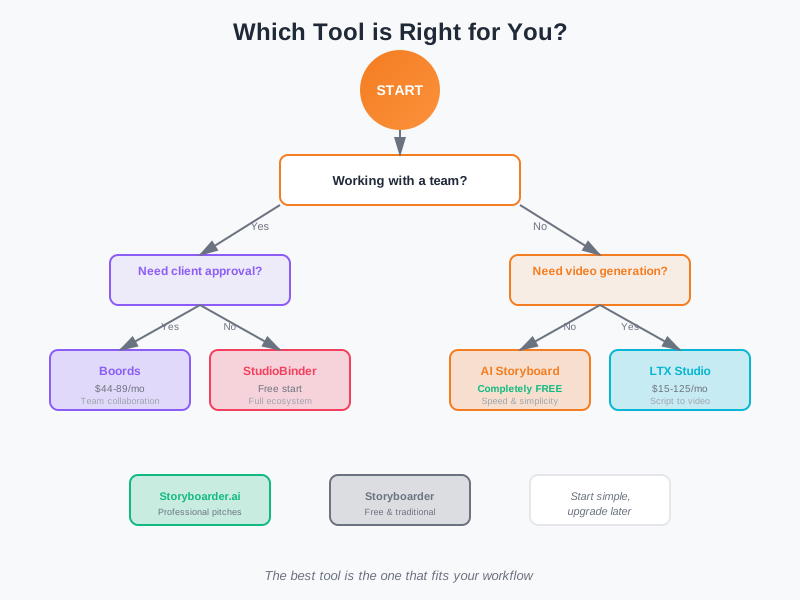
Choose the tool that fits your workflow, not the most expensive one
Choose AI Storyboard if: You want to generate storyboards quickly without learning a complex system—and you don't want to pay anything. Solo creators, short-form video makers, anyone who values speed and zero cost.
Choose Boords if: You work with a team or clients and need collaboration features. The feedback workflow alone is worth the price if you're managing approvals.
Choose LTX Studio if: You want to go from script to final video in one platform. The continuity from storyboard to video is its killer feature.
Choose Storyboarder.ai if: You're a professional filmmaker who needs polished visuals for pitches. The image quality and animatic features justify the cost.
Choose StudioBinder if: You're moving into actual production and need storyboards to connect to the rest of your workflow. The free tier is genuinely useful.
Choose Storyboarder if: You like to draw and don't want to pay a subscription. It's old-school but it works.
The Truth About Pricing in 2026
Here's something that doesn't get talked about enough: the market is fragmenting. We used to have "storyboard software" at one price point. Now we have tools ranging from completely free to $150/month, and they're solving different problems.
The tool that costs $200/month might be cheaper than the $30/month option if it saves you ten hours of revision work. Conversely, the free option might be the most expensive if it costs you a client because you couldn't iterate quickly enough.
Think in terms of cost per use, not monthly price. A $90 tool you use daily is cheaper than a $20 tool you use twice a year.
What's Missing?
I notice things none of these tools do perfectly yet. Character consistency across a full 90-minute storyboard? Still hit or miss. Complex action scenes with multiple moving parts? You'll need to generate and composite. Real-time collaboration where multiple people draw on the same board? We're not there yet.
The tool that nails these will change the landscape again. But we're not quite there in 2026.
My Honest Take
Here's what I tell people who ask me which tool to get: start with the simplest option that does what you need. You can always upgrade later. I've seen far more creators succeed by starting basic and outgrowing their tools than by starting with complex systems they never master.
The best AI storyboard tool is the one that gets out of your way and lets you create. Everything else is noise.