Most storyboard workflows assume one thing: a script. A script has scenes, and scenes have a beginning, middle, and end. There's spatial logic, a reason for each cut, and some kind of dramatic arc to structure the panels around.
Music videos don't have any of that — or rather, they have all of it compressed, looped, and subordinated to four minutes of audio that will keep playing whether your imagery makes sense or not. The music doesn't wait. Your boards have to move with it before a single camera is scheduled.
I'll admit: I came to music video storyboarding from scripted work, and the first time I tried to board a three-minute track the way I'd board a short film, I ended up with a document that looked fine on paper and fell apart on set within the first twenty minutes. The DP was asking where the second chorus started in the board. Nobody knew. The boards didn't have that information.
That failure is what made me rethink the process — and eventually, where AI tools started to become genuinely useful for this format.
Why Music Videos Are Different
The structure of a music video is the song. Not a story structure — a musical one. Intro, verse, pre-chorus, chorus, bridge, outro. And crucially, the emotional register of each section is already decided before you write a single frame. The chorus hits hard because the production hits hard. The verse breathes because the instrumentation pulls back. Your job as a director isn't to create those beats — it's to meet them visually, to amplify what's already there.
That creates a very different storyboarding problem. In scripted work, you're building toward a visual climax you control. In music video work, the climaxes are already in the track. Your storyboard isn't a plan for where the emotion goes — it's a response to where the emotion already is.
The practical consequence is that a music video storyboard has to be organized around the song's time code, not around scene numbers. And it has to answer a question that scripted boards rarely ask: how many panels do I need per section, and what's the cut frequency I'm planning for?
A verse might support eight to twelve panels with slow, deliberate cuts. A chorus might need thirty. That ratio has to be in your board before you generate a single frame, because it determines how many images you're asking AI to produce — and more importantly, how much visual coherence you need to maintain across a very short span of time.
The Beat Mapping Method
Before opening any AI tool, I do something unglamorous: I sit with the track and a text file, and I map the song's structure in plain language. Not timecodes at the second level — just section labels and rough durations.
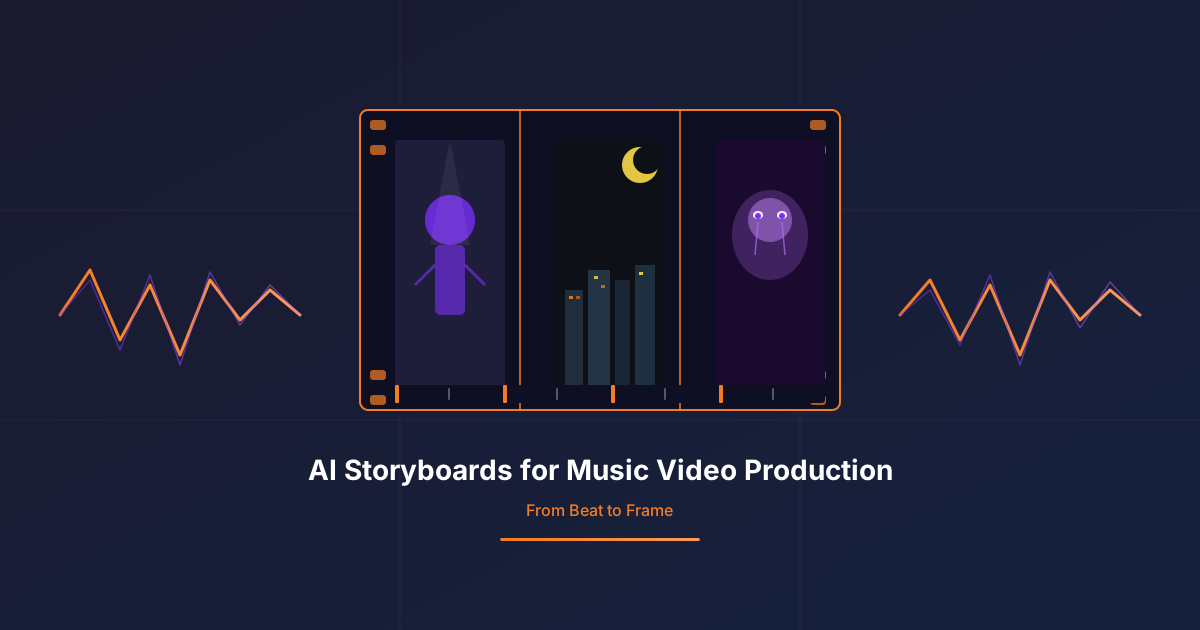
Something like: Intro (12 seconds), Verse 1 (32 seconds), Chorus (24 seconds), Verse 2 (28 seconds), Bridge (16 seconds), Final Chorus (28 seconds), Outro (10 seconds). That's it. Then I assign a rough panel count and a cut frequency intention to each section. The result is a simple table that looks almost embarrassingly low-tech — and it's the most important document in the whole pre-production process.
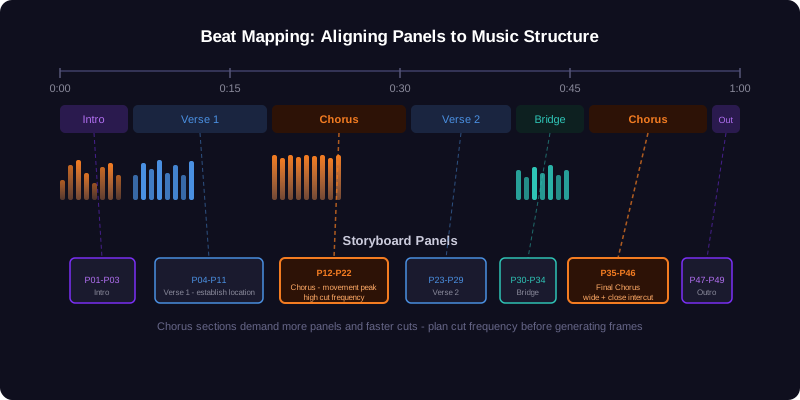
Why does this matter for AI? Because when you eventually go to generate panels, you're not asking for "a storyboard for this music video." You're asking for panels for a specific section, with a specific emotional register, a specific cut pace, and a specific spatial logic. That level of precision is what separates boards that work from boards that produce fifty beautiful frames with no discernible relationship to the music.
The chorus panels should feel different to generate than the verse panels. They should be tighter, more kinetic, more fragmented. If your prompt doesn't reflect that difference, the AI doesn't either — and you end up with consistent-but-wrong, which is its own kind of problem.
Locking Visual Anchors Before You Generate
Music videos are cut fast. The chorus of a three-minute track might have thirty cuts. If those thirty frames don't share a strong visual logic — a recurring character, a location, a color, an object — they look like thirty unrelated images from different shoots.
In scripted work, continuity is largely handled by the script itself. The same characters appear, the same locations recur, the same timeline anchors the viewer. In music video work, you have to engineer that continuity deliberately — especially when you're using AI, which has no inherent memory of what the last frame looked like.
What I call "visual anchors" are the three to five constant elements that define recognizable continuity across panels. Not everything about a frame — just the things that need to be identical from one cut to the next. The artist's outfit. A specific prop. The color temperature of a location. The direction the performer faces. Lock those before you generate anything, write them at the top of every prompt, and treat deviations as production problems, not creative variations.
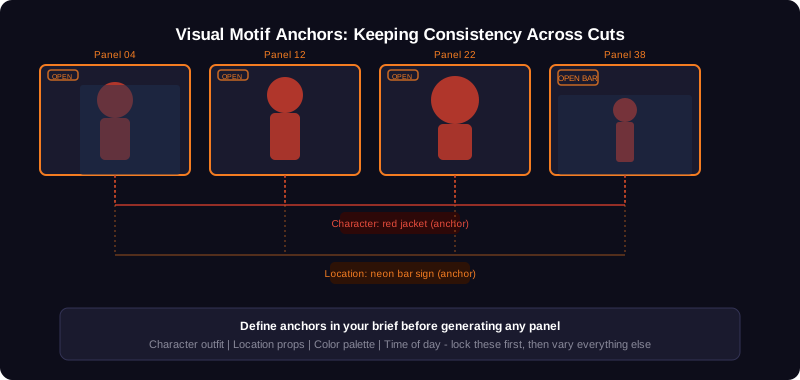
I've seen teams skip this step because it feels too rigid — "we want the AI to surprise us." That's a legitimate creative impulse in some contexts. In music video production, where your board will be shown to an artist, a manager, a label A&R, and a DP within the same week, surprise is not your friend. Coherence is. The surprise comes in the details of the frames, not in whether the artist looks like the same person from shot to shot.
Anchor rule of thumb: If you can't describe the anchor in ten words or fewer, it's not specific enough. "Woman in black coat, silver earrings, facing screen-left" is an anchor. "A stylish performer" is not.
Writing the One-Page Director's Brief
Here's where most AI-assisted music video workflows break down. Teams spend hours generating frames before anyone has agreed on what the video is actually about. The AI produces something. The director reacts to it. The artist reacts to the director's reaction. Suddenly the concept is being designed by a chain of responses to generated images rather than by human intention.
I'm not philosophically opposed to that process — sometimes a generated image unlocks a concept that nobody had consciously reached yet. But as a production workflow, it's dangerously inefficient. You end up with a hundred frames, most of which are discarded, and a storyboard that reflects accumulated AI decisions rather than a directed vision.
The discipline I've come to trust is this: write the one-page director's brief before you generate a single frame. Not a full treatment — that comes later, if needed. Just one page. What is the concept in one sentence? Who is the main character and what are their visual anchors? What are the three locations? What shot language belongs to each section? What is the color story?
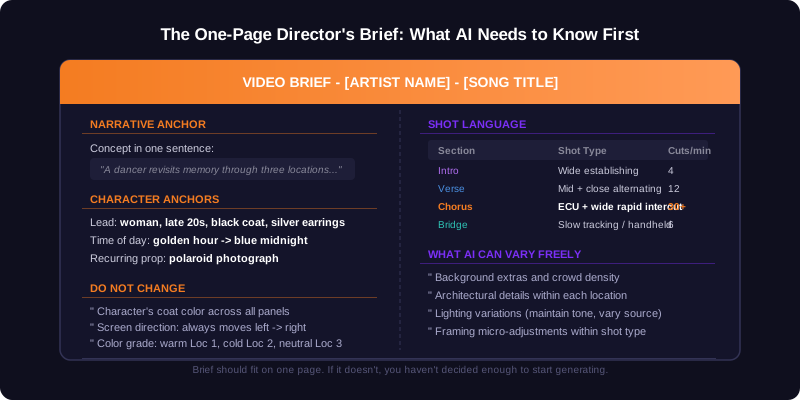
A brief that fits on one page means you've made the decisions. If it doesn't fit, you're still deciding — and generating frames at that stage is mostly noise. Strangely enough, this is the constraint that makes AI most useful: once you've removed the ambiguity, the tool actually has something to work with.
Using AI to Fill Panels, Not Invent the Concept
With the beat map and the director's brief in place, AI shifts from being a concept-generation tool to a panel-filling one. That sounds like a demotion. It's actually the opposite — it's where AI is fastest and most reliable in a music video context.
You're not asking: "show me what this video could look like." You're asking: "here's what verse one looks like — give me eight panels showing a woman in a black coat walking through a night market, warm practical light, shot mid-range, screen direction left to right." That prompt has enough specificity to produce something useful, and enough freedom in the incidental details (background, expression, precise framing) for the AI to contribute meaningfully.
The workflow I've settled on section by section looks like this:
- Write the beat map with panel counts.
- Write the one-page director's brief with all visual anchors.
- Generate intro and verse panels first — these define the visual world before the chorus explodes it.
- Generate chorus panels as a separate batch, referencing the established anchors but allowing faster, tighter framing.
- Manually review every panel for anchor consistency — especially character details and screen direction.
- Replace the two or three frames that broke continuity rather than regenerating the whole section.
Step six matters. In music video work, the temptation when a few frames feel wrong is to regenerate the entire section. That usually makes things worse — you lose the frames that worked, and the new batch brings new inconsistencies. Surgical replacement is almost always faster.
Ready to board your next music video?
Start with a beat map, lock your visual anchors, then use AI Storyboard to fill the panels — completely free.
Open AI StoryboardThe Label Conversation
One aspect of music video production that doesn't appear in most storyboard guides is the stakeholder chain. You're not just presenting boards to a director. You're presenting them to the artist, the artist's manager, the A&R person at the label, and sometimes a brand partner or a tour director with opinions about "the visual identity of the upcoming campaign."
AI-generated boards are actually very well suited to this environment — for a specific reason. They look finished enough to communicate tone and direction clearly to non-technical stakeholders, but not so finished that anyone mistakes them for a production promise. Hand-drawn boards can read as too rough for a label presentation; photorealistic renders can read as commitments to a look that hasn't been signed off on. AI boards sit in a productive middle register: polished enough to sell a direction, loose enough to invite revision.
The key is to present them in order, section by section, with the beat map visible alongside. When you show a chorus spread — eight panels, fast-cut energy, tight close-ups, the artist's face fragmented across multiple frames — and the song is playing in the background, the logic of the boards becomes immediately legible to people who don't know what a two-shot is. That's the communication advantage.
The risk, on the other hand, is commitment creep. An artist looks at a generated frame and says, "yes, exactly that location." Now you're locked to something you generated at random. My practice is to present boards with an explicit disclaimer: everything in the background is illustrative; only the character's look and the shot composition are firm. That framing has saved more than one production from an expensive misunderstanding.
From Boards to Set: What Survives
Something happens between the board and the shoot day. The location changes. The artist shows up in a different outfit than the one in the brief. The DP has a better idea for the chorus. The fog machine breaks. Any single one of these can unravel a hundred frames of careful planning.
The boards that survive are not the most detailed ones. They're the ones with the clearest structural logic — where every collaborator understands not just what the frame looks like, but why it exists at that moment in the song. If the DP understands that the verse panels are intentionally restrained because the chorus needs room to expand, they'll protect that restraint even when improvising on set. If they only see a board full of images without that logic made explicit, any detour feels arbitrary.
So the last thing I'd say about using AI in music video storyboarding is this: generate as many panels as you need, but annotate the structural decisions in plain language. Add a line under each section: "Verse 1 — 8 panels — medium pace — establish location and character." Add a note at the chorus: "Cut frequency increases, energy peaks — 28 panels planned." These annotations survive into the shoot day in a way that the frames themselves sometimes don't.
The boards are a communication device. The music already knows where it's going. Your job is to show everyone else how to get there before the cameras roll.