Feature sets and prices change. Use this page to create a shortlist, then verify limits, commercial rights, export formats, and current pricing on each official site.
The Reality Check
Start with the task you repeat: drafting frames, collecting approvals, managing a shoot, drawing panels, or generating video. A larger feature list adds value only when those features remove work from your real process.
Test one representative scene before committing. Count the steps from source text to an approved board and check whether the exported result fits the next production stage.
Checked August 13, 2026: Product positioning was reviewed against the official pages linked below. Pricing and feature limits can change, so verify them before purchasing. All trademarks belong to their respective owners.
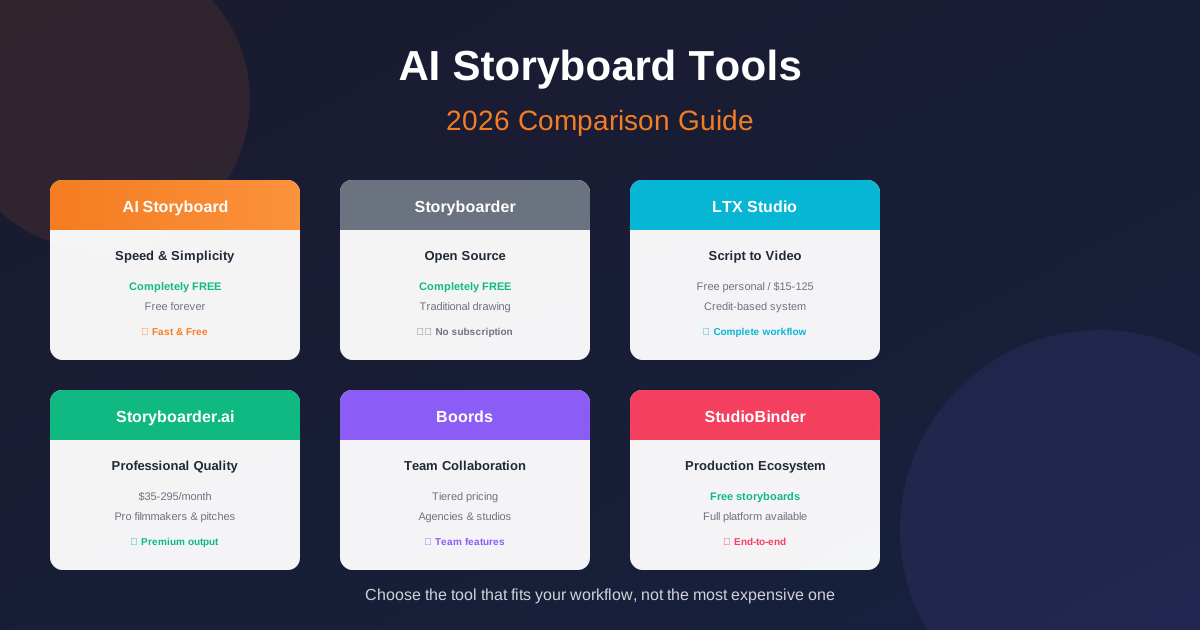
AI Storyboard (app.ai-storyboard.com)
AI Storyboard provides a browser workspace for turning scene text into editable shots and generating visual references. No account is required.
What it does well: Assisted and manual project creation lead into an editor with shot details, image generation, selected frame-to-video tools, and local browser project storage.
The standout feature: You can open the workspace without registration and keep saved project data in the browser.
The trade-offs: It does not provide shared team review, approval history, call sheets, scheduling, or a production-management ecosystem. AI requests still use a remote backend and provider.
Best for: Solo creators, short-form video makers, anyone who values speed and simplicity over advanced features
Pricing: The core workflow currently has no paid subscription. Generation availability can depend on service capacity and provider limits.
Boords: The Team Player
Boords positions itself as pre-production software for video agencies and brand teams, with storyboards, animatics, sharing, review, and sign-off in one workflow.
What it does well: Frame-level comments, versions, client approvals, animatics, and a shot-list view support teams that need an audit trail around feedback.
The standout feature: Review and sign-off remain attached to the relevant board version instead of being scattered across exported files and email.
The trade-offs: You're paying for features solo creators might never touch. The learning curve is real if you're just making storyboards for yourself.
Best for: Agencies, production teams, anyone working with clients who need to approve visual concepts
Pricing: Boords publishes current plan details on its official site.
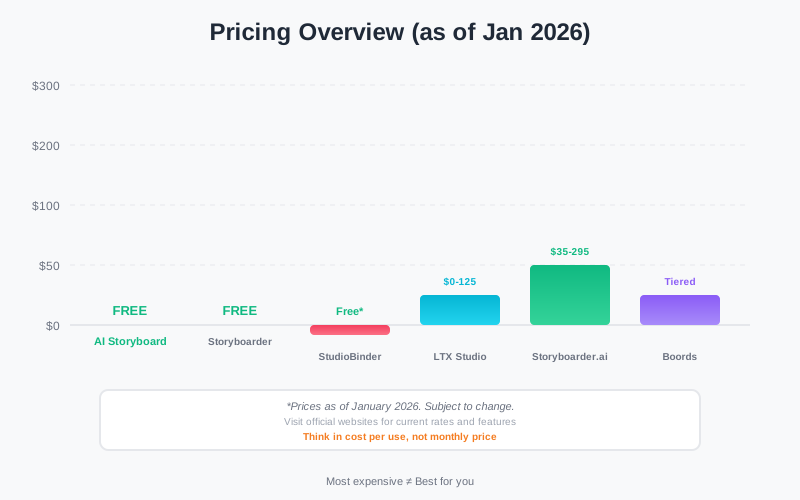
Pricing comparison: think in cost per use, not monthly price
LTX Studio: The All-in-One Bet
LTX Studio covers a broader AI video workflow from concept and script through dynamic storyboards, generated media, timeline editing, and sound.
What it does well: Its official product page emphasizes camera and keyframe controls, visual references, reusable character and location elements, and team collaboration inside one creative suite.
The pricing model: Generation products often meter usage or separate plans by capability. Check LTX's current plan page and commercial-use terms for the workload you expect.
The trade-offs: The complexity is real. You're learning not just a storyboarding tool but an entire production platform. And if you just need simple storyboards without the video generation, you might be paying for capabilities you won't use.
Best for: Creators who want to go from script to final video in one system, short-form content producers
Pricing: Verify current plans and usage terms on the official LTX site.
Storyboarder.ai: The Professional's Choice
Storyboarder.ai markets a script-to-storyboard workflow with generated visuals and previsualization tools.
What it does well: The product targets creators who want to move from a written script toward generated scenes and presentation-ready visual material.
Check before choosing: Run a representative multi-character scene and confirm consistency, edit controls, export formats, generation limits, and commercial rights.
The trade-offs: A generation-led product may include capabilities a team does not need when the requirement is drawing, approvals, or production scheduling.
Best for: Professional filmmakers, anyone pitching to investors or studios
Pricing: Verify current tiers and generation allowances on the official Storyboarder.ai site.
StudioBinder: The Production Ecosystem
StudioBinder places storyboard creation inside a production-management system that also covers scripts, shot lists, scheduling, call sheets, and related planning.
What it does well: Storyboard information can remain connected with other production documents rather than moving between unrelated tools.
The standout feature: The surrounding production ecosystem matters when a board must feed a shot list, schedule, and call sheet.
The trade-offs: Solo creators who need only a quick visual draft may not use the broader production-management features.
Best for: Filmmakers moving from pre-production into actual production, teams managing complex shoots
Pricing: Verify current workspace and production-plan limits on StudioBinder's official site.
Storyboarder (Wonder Unit): The Free Option
Storyboarder by Wonder Unit is a downloadable, open-source application built around drawing and organizing storyboard panels.
What it does well: Drawing tools, shot organization, timing, and 3D reference support a traditional story-artist workflow without requiring AI generation.
The trade-offs: Teams that need hosted review, approvals, or integrated AI generation will need another service or a separate handoff.
Best for: Traditional artists, indie filmmakers on tight budgets, anyone who prefers drawing over prompting
Access: The current web workspace can be opened without a paid checkout. Confirm current availability before committing a production workflow.
So, Which Tool Should You Choose?
Choose the smallest workflow that handles the next real project. Expand only after a missing capability creates repeated work.
Let me make it simpler:
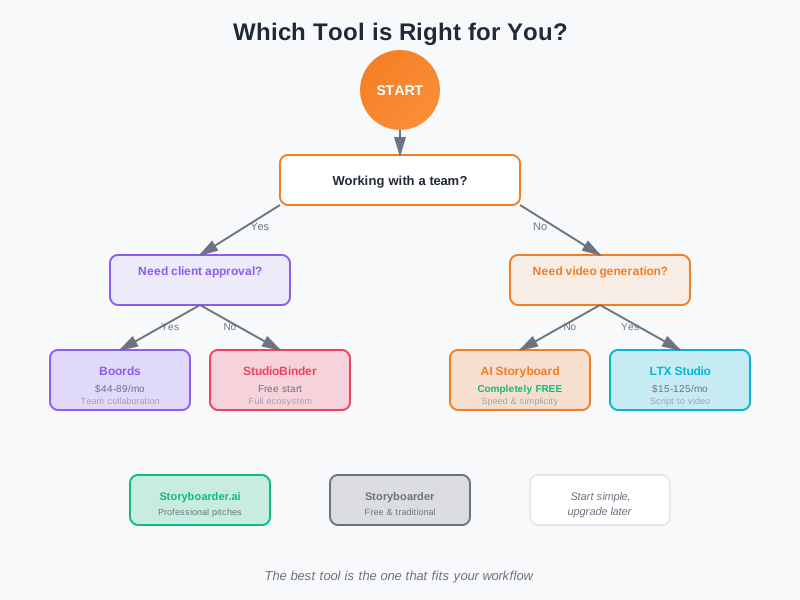
Choose the tool that fits your workflow, not the most expensive one
Choose AI Storyboard if: You want a no-account browser workspace for scene breakdown, editable shot details, and generated visual references.
Choose Boords if: You work with a team or clients and need collaboration features. The feedback workflow alone is worth the price if you're managing approvals.
Choose LTX Studio if: You want to go from script to final video in one platform. The continuity from storyboard to video is its killer feature.
Choose Storyboarder.ai if: You're a professional filmmaker who needs polished visuals for pitches. The image quality and animatic features justify the cost.
Choose StudioBinder if: You're moving into actual production and need storyboards to connect to the rest of your workflow. The free tier is genuinely useful.
Choose Storyboarder if: You like to draw and don't want to pay a subscription. It's old-school but it works.
The Truth About Pricing in 2026
These products solve different problems, so a monthly price comparison alone gives a weak answer.
Estimate the number of active users, generated frames, review rounds, exports, and production documents required each month. Then compare the current plan limits against that workload.
Include migration and handoff costs. A cheap visual tool can create extra work if the approved board must be rebuilt in another system.
What's Missing?
Test character consistency across several locations and angles, complex multi-subject action, revision history, and simultaneous editing. Marketing pages rarely show the exact edge case that creates the most work in production.
The tool that nails these will change the landscape again. But we're not quite there in 2026.
A Practical Selection Rule
Start with the simplest option that completes one representative project. Keep the source material and export formats portable so the team can change tools when the workflow changes.
The right tool leaves the approved visual plan in a form that the next collaborator or production stage can use.